Standardize Projects with SharePoint Templates
Your Project Management Success with BrightWork Online.
*Applies to the Americas, Australia, and Africa *Applies to Europe, Middle East, and Asia
Shared Cloud
Minimum 10 Users
User/month, billed annually
Key Features:
- Cloud-Hosted BrightWork
- Built on SharePoint
- No On-Premise Setup
- Project and Portfolio Management
Dedicated Cloud
Unlimited Users
User/month, billed annually
Key Features:
- Based on Your Cloud Configuration
- Private Cloud Environment
- Built on SharePoint
- Dedicated Environment
- Project and Portfolio Management
FedRAMP
Unlimited Users (U.S.)
User/month, billed annually
Key Features:
- Based on Your Cloud Configuration
- SaaS-Level, Compliant SharePoint Environment
- Supports Moderate, High & DoD IL 2/4/5
- Designed for U.S. Federal Government Use
- Project and Portfolio Management
HIPAA/HITRUST
Unlimited Users (U.S.)
User/month, billed annually
Key Features:
- Based on Your Cloud Configuration
- Hosted on Microsoft Azure
- Designed for Healthcare Organizations
- Project and Portfolio Management
Trusted by industry leaders
Onboarding Services
All new BrightWork customers must buy onboarding services to get started on the right foot managing projects and programs.
The BrightWork Deployment JumpStart combines best-practice templates and a proven 3D Deployment approach to accelerate success.
A typical JumpStart includes 36 hours of service delivery over 3 to 6 weeks and costs $7,875 or €5,850.
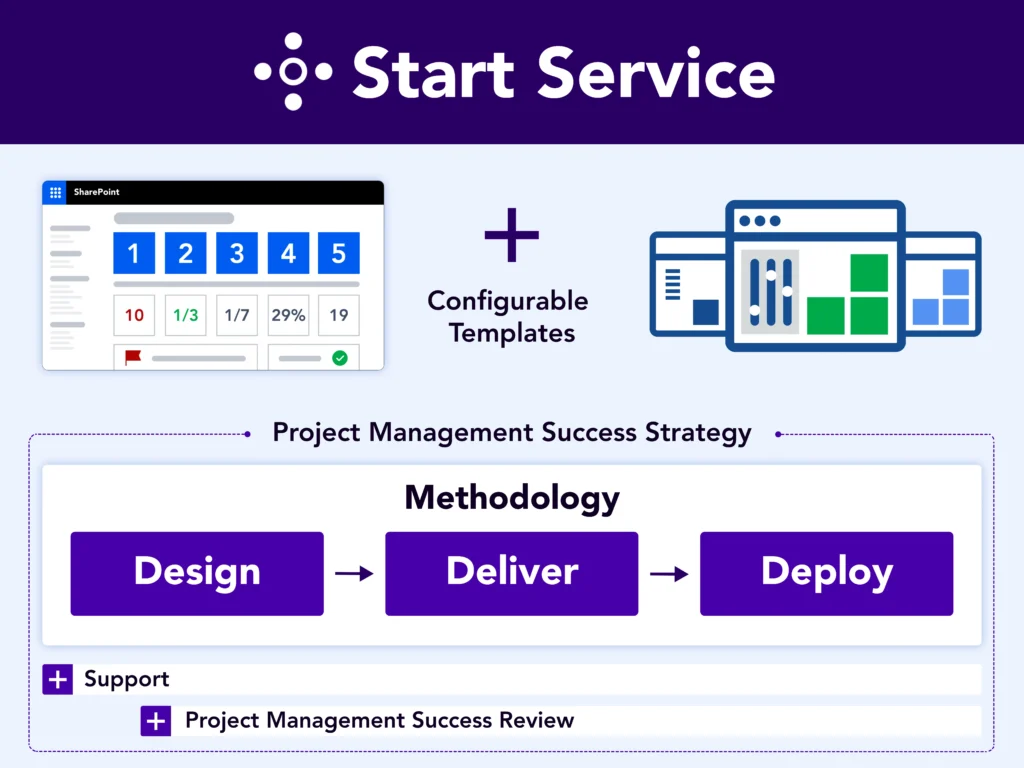
BrightWork Deployment Approach
Leverage our proven approach Start-Evolve to design your project management journey.
Start
Evolve
Keep Evolving
Customer Success Stories









Frequently Asked Questions
BrightWork Online pricing is based on the number of named users accessing BrightWork. The cost of the subscription is based on a per user per month fee that is billed monthly or annually.
A named user is counted as any team member who will be accessing BrightWork within the SharePoint environment.
No, FedRAMP is only available to U.S. Federal, DoD, NatSec, and civilian agencies within the United States. HIPAA/HITRUST is only available to healthcare organizations within the United States.
BrightWork provides several training, advisory, and technical project management services to our customers. To learn more, explore BrightWork Professional Services.
All new BrightWork customers need to buy onboarding services to get started on the right foot with your project and portfolio management using BrightWork. For example, the BrightWork Deployment JumpStart includes 36 hours of service delivery over a 1 to 3 month period, and costs $7,875 or €5,850. Contact our sales team to discuss getting started with BrightWork onboarding services.
Yes, you can try BrightWork free for 30 days. During your free trial, you will have access to the full BrightWork project and portfolio management software with no feature limitations. You can manage as many projects as you want and add up to 5 users in your free trial.
Yes, BrightWork On-Premise can be installed on the platform editions of SharePoint 2019, 2016, and 2013 (any version). For more detail, including pricing, visit BrightWork On-Premise Pricing.
Looking for templates on Microsoft 365?
BrightWork 365 lets you plan, manage, and collaborate in Microsoft 365.